
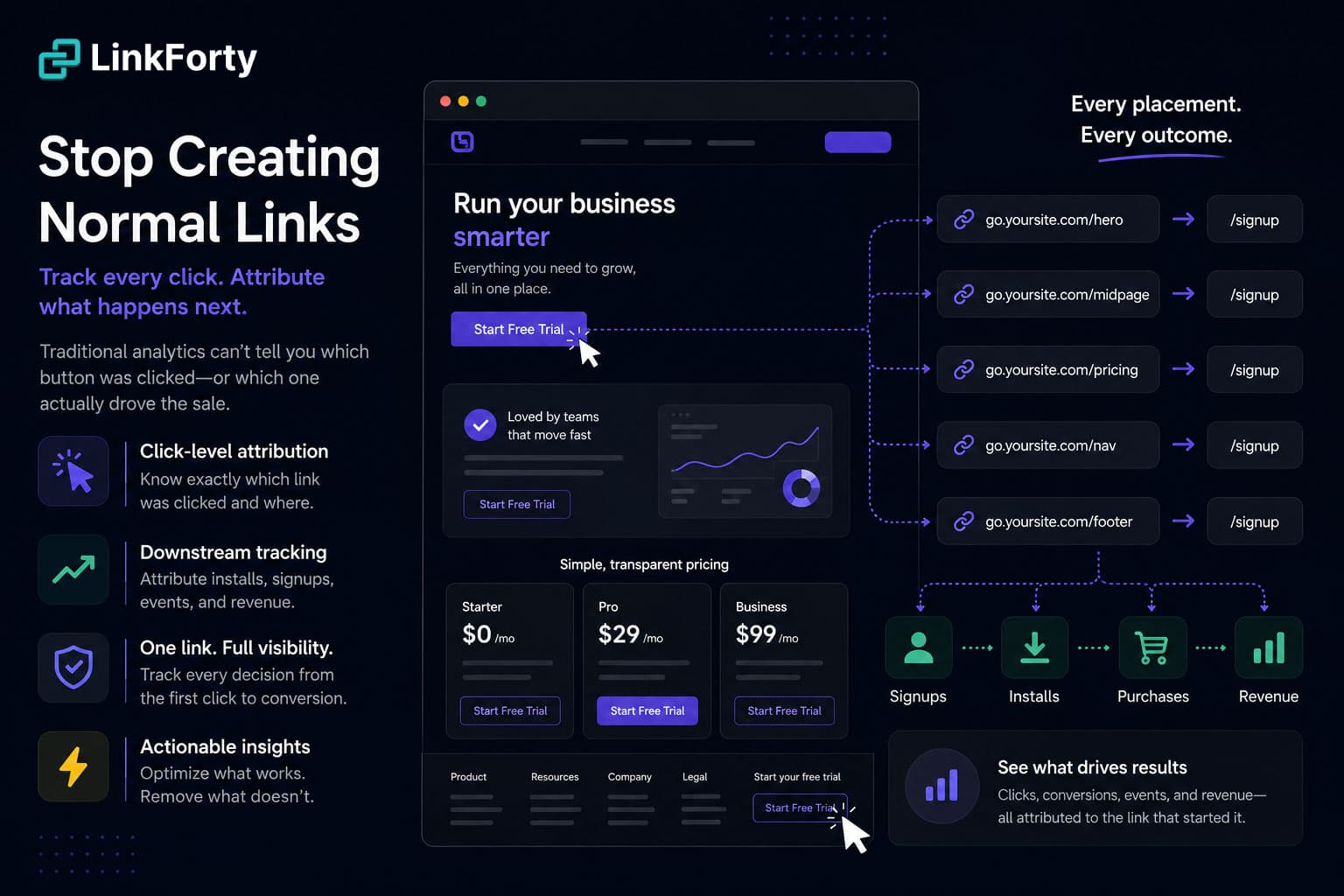
Most websites are flying blind
You spend real money driving traffic — Google Ads, social, email, influencers, SEO, referrals. You optimize landing pages, rewrite headlines, test calls to action.
Then someone visits, they click, and that's where your visibility ends.
Traditional analytics can usually tell you which page a visitor landed on, and often where they came from. But one of the most valuable questions tends to go unanswered:
Which link did they click — and where on the page was it?
That missing piece is one of the biggest blind spots in website analytics, and it's the difference between knowing where users went and understanding what convinced them to go there.
Traditional analytics treat every click the same
Imagine your homepage has five different ways to start a free trial:
- A "Start Free Trial" button in the hero
- A button halfway down the page
- A pricing-table CTA
- A sticky navigation button
- A footer link
Every one points to the same destination:
/signup
Open Google Analytics, Adobe, or most traditional tools and you'll see traffic arriving at /signup. Useful — but which button earned the click? Was it the headline? Did they scroll to pricing? Did they ignore everything until the footer?
Without click-level attribution, all five journeys look identical, so you can't answer the questions that actually move the needle:
- Which CTA converts best?
- Which page section drives the most revenue?
- Does moving a button higher increase conversions?
- Which navigation links are actually used?
- Which feature section influences purchases?
Page analytics vs. click analytics
Most platforms answer page questions: which pages get traffic, where visitors came from, how long they stayed, where they went next. Those metrics matter.
Click analytics answers a different set:
- Which exact link was clicked?
- Which placement on the page earned the engagement?
- Which CTA produced the highest conversion rate?
- Which links get ignored?
- Which placements drive downstream revenue, not just traffic?
This is the difference between knowing where users visited and understanding why they moved through your funnel.
The fix: make every placement its own link
LinkForty gives you two ways to close this gap. We'll start with the most complete one, which is also the simplest to describe: a placement is a link.
Instead of pointing all five buttons at the same raw /signup URL, you give each placement its own LinkForty link — every one redirecting to /signup, but each a distinct, measurable asset:
go.yoursite.com/trial-hero      →  /signup
go.yoursite.com/trial-midpage   →  /signup
go.yoursite.com/trial-pricing   →  /signup
go.yoursite.com/trial-nav       →  /signup
go.yoursite.com/trial-footer    →  /signup
Now every click carries the context of where it happened. Your dashboard's Top Links view ranks them against each other automatically — no new report to learn, no tags to wire up. The per-link analytics you already have become your placement breakdown:
- Hero CTA: 18% fewer clicks than expected
- Pricing-table buttons: up 42%
- Footer link: quietly out-converting the hero on mobile
That's actionable data instead of assumptions — and it changes how you design every future page.
Won't that create a lot of links? It would, if you built each one by hand. You don't. Use a Template to stamp out a consistent set of placement links in seconds, and group them under a Project so a page's links stay together. The links work for you; they're not busywork.
The real payoff: attribution that follows the click
Plenty of tools can tell you which button got clicked. The reason to do this in LinkForty is what happens next.
Because every placement is its own link, LinkForty attributes the entire downstream journey back to it — not just the click:
- Account creation
- Trial starts
- Purchases and subscription upgrades
- App installs
- Custom product events
- Revenue
So you don't just learn that the pricing-table CTA gets more clicks. You learn it drives more signups, and more revenue, weeks later — and that the hero button, despite its traffic, mostly sends tire-kickers. That's a question raw page analytics can't touch, and it's exactly what a per-link model answers, because the whole funnel hangs off the link that started it.
See what happens on the page, too
Pair your links with the Web Pixel — one lightweight script on your site — and the loop closes completely. On-site activity (page views, engagement, conversions) attributes straight back to the link that drove the visit, even when the conversion happens pages later with no UTM in the URL. Last-click, the way you'd expect.
It's the same model as our mobile SDKs: own what happens after the click, wherever the click happens.
A lighter-weight option: tag placement with utm_content
A link per placement is the most complete approach, but it isn't the only one. If you'd rather not manage a link for every button — and you mainly care about on-site outcomes — keep a single destination and tell placements apart with a utm_content value on each on-page link:
/signup?utm_content=hero
/signup?utm_content=pricing-table
/signup?utm_content=footer
The Web Pixel reads utm_content from the landing URL, and the Content breakdown in your Analytics → Web tab splits sessions, conversions, and revenue by placement — the same shape of answer the link-per-placement view gives, without adding a single link. Name those values once in the UTM Library and hero reads as Hero CTA everywhere it appears.
The trade-off is scope: this is a web signal. It splits on-site engagement and conversions by placement, but it can't break app installs out by placement, and it leans on the pixel being installed. When a placement matters enough to track end-to-end — through installs and revenue, or into your app — reach for a link of its own.
Which should you use? Start with utm_content tagging when you're optimizing a single high-traffic page and want a fast read on which section performs. Graduate to a link per placement when the journey continues past the click — into a purchase, an install, or your app — and you want every step attributed.
A worked example
You redesign your pricing page and move the primary CTA higher. A month later, conversions are up 12%. Good news — but why? More traffic? A different campaign? The new placement? With one shared /signup URL, you're guessing.
With a link per placement, you don't have to. You open Top Links and see the hero CTA's conversions jumped while the footer's held flat — the placement change worked, and you can prove it. Next quarter you apply the same move to three more pages with a Template, already knowing it pays off.
Stop measuring pages. Start measuring decisions.
Every click is a decision: one button instead of another, one message instead of another, one path through your site instead of dozens. If your analytics only tell you someone eventually reached a destination page, you're missing the decision that got them there — usually the most valuable data you can collect.
Give every placement its own LinkForty link, and each one becomes an intelligent data point that follows users beyond the click, attributes what they do next, and reveals which experiences actually drive growth.
Because the goal isn't to know where users ended up. It's to understand what convinced them to get there.
Ready to stop creating normal links? Open your dashboard and turn your highest-traffic page into a set of placement links — or, for a faster first read, tag that page's buttons with utm_content and watch the Content breakdown fill in. New to naming links? The creating links guide helps you plan it first.