
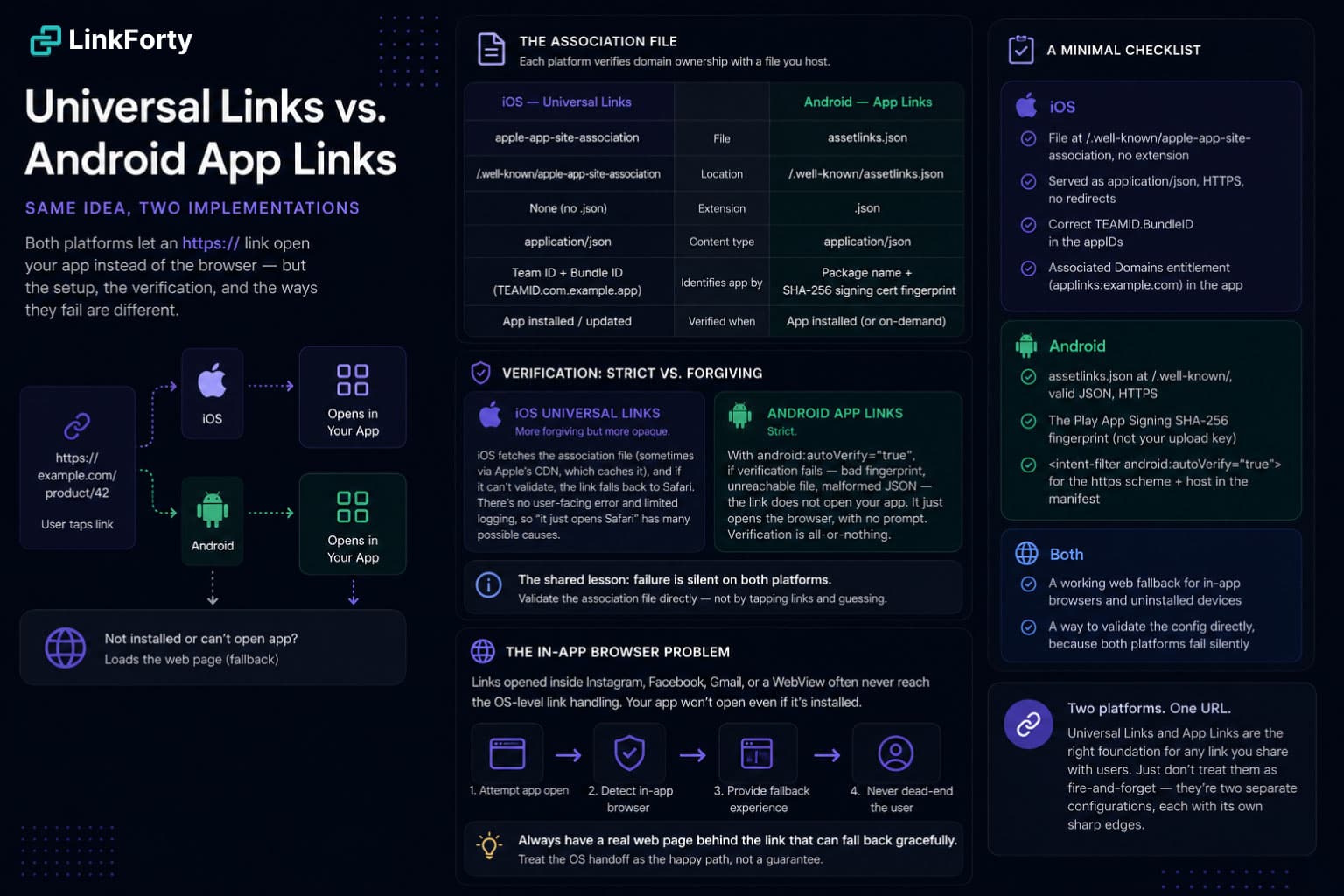
Same idea, two implementations
Both platforms solved the same problem — let a normal https:// URL open an installed app instead of the browser — and both solved it the same way in spirit: prove you own the domain, then the OS trusts the link. But the details differ enough that "it works on iOS" tells you almost nothing about Android, and vice versa. Here's the practical comparison.
The association file
Each platform verifies domain ownership with a file you host on your site.
Two things bite people immediately:
- On iOS, the file has no extension and must be served as raw JSON with the right content type and no redirects. A CDN that "helpfully" adds
.jsonor 301s towwwwill silently break Universal Links. - On Android,
assetlinks.jsonpins your app's signing certificate fingerprint. If you ship through Play App Signing, the fingerprint Google uses is not your upload key — a mismatch is the single most common App Links failure.
Verification: strict vs. forgiving
This is the biggest behavioral difference.
Android App Links are strict. With android:autoVerify="true", if verification fails — bad fingerprint, unreachable file, malformed JSON — the link does not open your app. It just opens the browser, with no prompt. Verification is all-or-nothing.
iOS Universal Links are more forgiving but more opaque. iOS fetches the association file (sometimes via Apple's CDN, which caches it), and if it can't validate, the link falls back to Safari. There's no user-facing error and limited logging, so "it just opens Safari" is the universal symptom of a dozen different root causes.
The shared lesson: failure is silent on both platforms. Nothing tells you the link tried to open the app and couldn't. That's why validating the association file directly — rather than tapping links and guessing — is the only reliable way to debug. (We built a free AASA Validator for the iOS side, which is the fussier of the two.)
The in-app browser problem
Even with everything configured correctly, one category of traffic defeats both systems: in-app browsers. When someone taps your link inside Instagram, Facebook, Gmail, or a WebView, the tap often never reaches the OS-level Universal Link / App Link machinery, so the app doesn't open even though it's installed.
The robust pattern is to always have a real web page behind the link that can:
- Attempt the app open.
- Detect the in-app browser context.
- Fall back to a web experience (or nudge the user to open in the system browser) instead of dead-ending.
Your link should never assume the OS handoff will fire. Treat it as the happy path, and design the fallback deliberately.
A minimal checklist
iOS
- File at
/.well-known/apple-app-site-association, no extension,application/json, HTTPS, no redirects. - Correct
TEAMID.BundleIDin theappIDs. - Associated Domains entitlement (
applinks:example.com) in the app.
Android
assetlinks.jsonat/.well-known/, valid JSON, HTTPS.- The Play App Signing SHA-256 fingerprint (not your upload key).
<intent-filter android:autoVerify="true">for thehttpsscheme + host in the manifest.
Both
- A working web fallback for in-app browsers and uninstalled devices.
- A way to validate the config directly, because both platforms fail silently.
Universal Links and App Links are the right foundation for any link you share with users. Just don't treat them as fire-and-forget: they're two separate configurations, each with its own sharp edges, sitting behind one URL.