
Nobody builds the whole thing anymore
Building an app used to mean owning the whole machine — your own servers, your own auth, your own everything. That era is over. Today you assemble managed layers and glue them together with the code that's actually unique to your product.
You don't write an authentication server; you reach for Auth0, Clerk, or Supabase. You don't touch a payment terminal; Stripe does that. You don't run mail servers; SendGrid or Postmark send the email. Push notifications, error tracking, product analytics, file storage — every one of them is a specialized service with an SDK and a dashboard, run by people whose entire job is that one problem.
There's one layer, though, that most teams still skip or hand-roll: the link layer — the deep links that carry people to the exact right place in your app, and the attribution that tells you what they did after they tapped. This post is about why that layer matters, what the rest of the stack looks like around it, and how LinkForty runs it as managed infrastructure that plugs into your code in a few lines.
The modern app stack, layer by layer
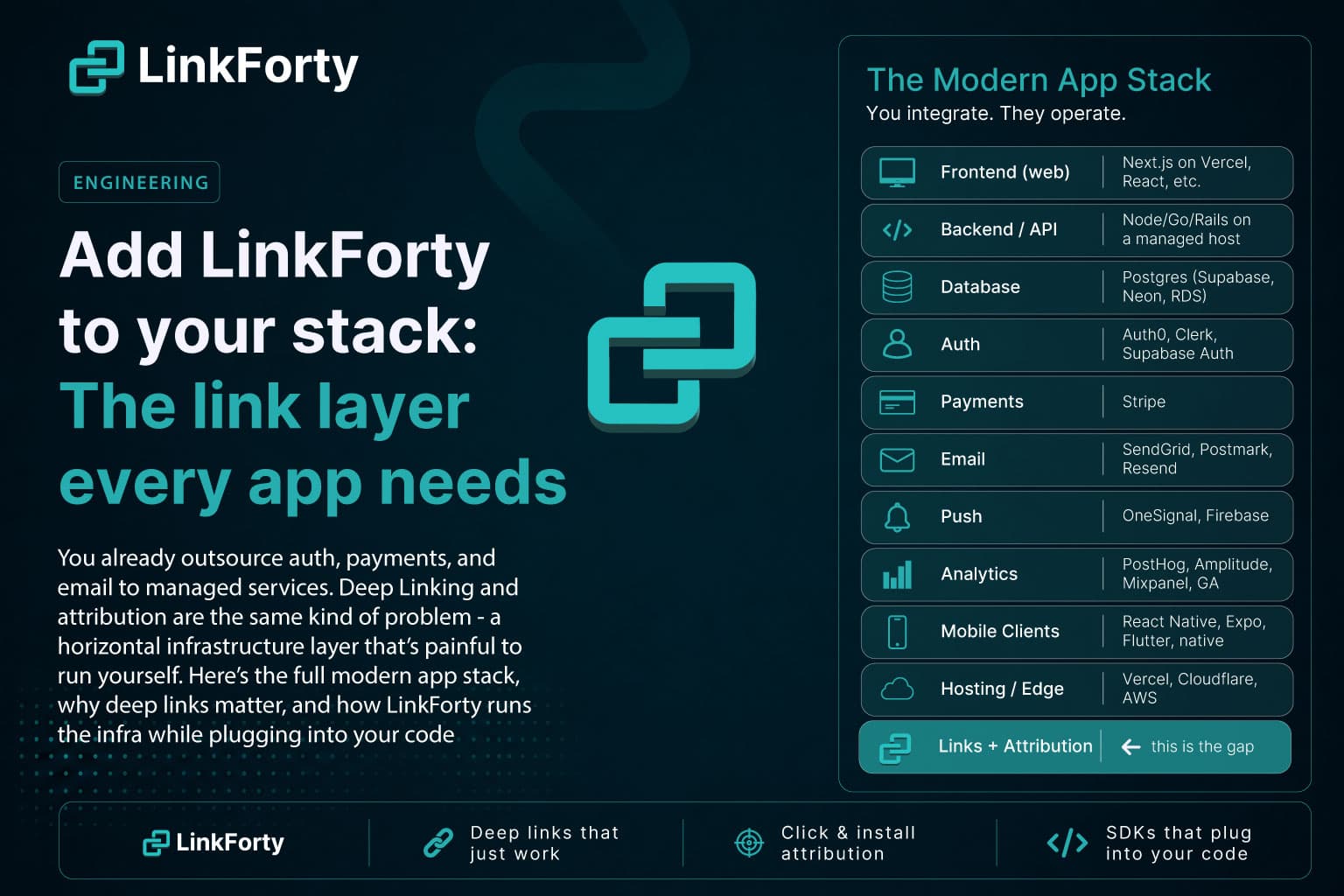
Here's what a typical product actually depends on today. Almost none of it is code you write from scratch:
Look at the pattern. Every row is a layer you integrate rather than operate: you drop in an SDK or call an API, and the provider runs the hard infrastructure behind it. The link layer is the one row teams routinely leave as "we'll bolt on some UTM parameters later." That's a mistake, because it's the same shape of problem as all the others — and just as painful to run yourself.
Why deep links matter
Every channel you invest in — ads, email, social, referrals, QR codes, influencers — ends the same way: someone taps a link. That tap is the seam between all of your marketing and your actual product. What happens in that moment decides whether the effort converts.
A plain URL handles it badly. Tap one on a phone and you often land on a website when you have the app installed, or get dumped on the App Store home screen when you don't — the specific thing you wanted, gone. Deep links fix the tap:
- The app is installed → open it, on the exact screen the link points to.
- The app isn't installed → send them to the right store, remember what they wanted, and after they install, land them on that exact screen. (This is deferred deep linking — the highest-value and hardest case. We break it down in Deferred Deep Linking, Explained.)
- Desktop or an unsupported device → fall back to a sensible web page.
Get that right and the payoff compounds: higher conversion from every campaign, onboarding that doesn't lose people at the install cliff, and — because each link is measurable — the ability to know which channel, campaign, and even which button actually drove a signup, an install, or a purchase. That last part is attribution: following the user after the click, on web and mobile. (More on the per-link version of that in Click-Level Attribution, and the fundamentals in What Is Deep Linking?.)
The link layer is infrastructure, not a feature
Here's the thing teams underestimate: making that tap work correctly is a full backend, edge, and platform-integration problem. To do it yourself you'd have to build and operate:
- Hosted association files. iOS Universal Links need an
apple-app-site-associationfile and Android App Links needassetlinks.json, each served from/.well-known/with the exact content type, no redirects, and the right app IDs and signing fingerprints. Get one detail wrong and links silently fall back to the browser with no error. (We built a free AASA Validator precisely because this fails so quietly.) - A device-aware redirect engine. A short-link domain that decides, per request, between the App Store, the Play Store, a web fallback, or opening the app — and handles in-app browsers (Instagram, Gmail, etc.) that bypass the OS handoff entirely.
- Deferred-attribution matching. The Play Install Referrer, plus multi-signal device fingerprinting with tight recency windows and hard tenant isolation, so a fresh install can be tied back to the click that caused it — without inventing false matches.
- A click and event pipeline. Storage and analytics for clicks, installs, downstream conversions, and revenue.
- A custom domain with SSL, kept in step with Apple's and Google's ever-shifting platform rules.
That's not a feature you sprinkle on at the end. It's a horizontal infrastructure layer — exactly like auth or payments — and it's why most teams either under-build it (a few UTM tags) or skip it and fly blind.
How LinkForty fits: it runs the infra, it plugs into the code
The whole idea is a clean division of labor. The parts that are painful because they touch Apple's and Google's platform rules, live at the edge, and need a data pipeline — LinkForty runs those. The part that's specific to your product — which screen a link opens, which event counts as a conversion — stays a few lines in your codebase.
We run the infrastructure
- Hosted association files on your own custom domain (e.g.
go.yourapp.com), served with the correct content types and no redirects, SSL provisioned for you via Cloudflare for SaaS. Nothing to host, nothing to get subtly wrong. - A device-aware redirect engine on that short-link domain that routes each tap to the right store, web fallback, or app screen — including the in-app-browser edge cases.
- Click tracking and install attribution — the deferred-deep-linking backend (Install Referrer + multi-signal fingerprint matching, isolated per workspace).
- The analytics pipeline — clicks, installs, downstream events, and revenue, already stitched to the link that started the journey.
You don't host a file, run a redirect service, or build a matching pipeline. If you'd rather run it yourself, the engine is open source — see the self-hosting guide — but the managed layer exists so you don't have to.
It plugs into the code
- Mobile — drop in an SDK for React Native, Expo, iOS, Android, or Flutter. A few lines to initialize it, receive incoming deep links, and collect the signal needed for deferred links. Your code just says which screen to open. See SDK integration.
- Web — one lightweight Web Pixel script closes the loop on the web side, so on-site activity attributes back to the link that drove the visit — even when the conversion happens pages later with no UTM in the URL.
- Create links from anywhere — the dashboard, a REST API, or the MCP server, so links can be generated programmatically: per placement, per campaign, per user. See creating links.
- Backend — webhooks push click, install, and conversion events into your own systems, so the link layer feeds the rest of your stack.
Roughly, the mobile integration is this small:
import { LinkForty } from '@linkforty/mobile-sdk-react-native';

// Initialize once, near app startup.
LinkForty.initialize({ appToken: 'at_your_workspace_token' });

// Route incoming (and deferred) deep links to the right screen.
LinkForty.onDeepLink(({ path, params }) => {
  navigation.navigate(path, params); // your app decides what this means
});
And the web side is a single script:
<script async
  src="https://cdn.linkforty.com/pixel.js"
  data-site-key="ws_your_site_key">
</script>
That's the shape of it — LinkForty handles the association files, the redirect edge, the fingerprint matching, and the analytics; your code contributes the two things only you can: which screen a link opens and which event counts. (Snippets are simplified — check the linked docs for the exact, current API before you ship.)
Where it sits in the stack
Put plainly: LinkForty is the links + attribution layer, sitting right alongside auth, payments, and push — spanning both web and mobile. Every channel flows through it the same way:
channel (ad / email / social / QR) → LinkForty link → the exact app screen or web page → attributed event (signup, install, purchase, revenue)
You get the behavior — links that open the right place and attribution that follows the click — without operating any of the machinery that makes it work.
The takeaway
You already let specialists run the layers that are too hard and too undifferentiated to own yourself. You don't run a payment network to charge a card, or a mail cluster to send a receipt. The link layer is the same kind of problem: platform-specific, edge-heavy, data-hungry, and unforgiving of small mistakes.
So treat it like the infrastructure it is. Add LinkForty to the stack, and every tap — from every channel, on web and mobile — lands in the right place and tells you what happened next.